
5 Salesforce Tips For Sales Leaders To Increase Win Rates
- By SalesMethods
- Posted 03/2026
- 10 mins
- Blogs
Salesforce sits (or at least is supposed to sit) at the centre of many businesses. We’ve all heard the CRM giant described as a “single source of truth”. Yet, whether it’s Google Sheets or Excel, our team are consistently hearing from salespeople who are managing deals or deal data outside of Salesforce.
In practice, lots of sales teams spend as little time in Salesforce as possible. Salesforce itself found that salespeople spend less than 30% of their time actually selling. This leads to opportunity notes being collected in personal documents, next steps being tracked in to-do lists, and opportunities only being updated when a forecast call is approaching. Behaviours like these lead to Salesforce becoming a system used for reporting, rather than helping your team win more business.
When Salesforce is configured with end users (your sales team included) in mind, it can become much more than a data warehouse. For example, Salesforce can ensure leads reach the right salespeople quickly, enable your team to progress deals through a consistent sales process, and provide leaders with a clear, trusted view of what is really happening in the pipeline.
We asked a few Salesforce veterans on the SalesMethods team for five practical Salesforce tips that help sales teams close more deals, while giving sales leaders greater visibility and confidence when managing the pipeline.
Let’s take a look at what they said:
1. Use Salesforce to Route Inbound Leads to the Right Salesperson Immediately
All salespeople understand the importance of responding to inbound leads promptly. Harvard Business Review found that businesses attempting to contact a potential customer within an hour of receiving a query were nearly seven times more likely to qualify the lead (meaning they had a meaningful conversation with a key decision maker) than those that responded even an hour later. Even more striking, they were sixty (yes, sixty) times more likely than companies that waited a full day. The same study also found that the average response time was 42 hours, highlighting how often companies fail to follow up quickly enough.
So, how can you help your sales team reach out to leads faster?
Use Salesforce to automate your lead routing so that leads instantly reach the right person. When lead routing is unclear or handled manually, leads are much more likely to sit unassigned, get picked up by the wrong salesperson, or be passed around internally before anyone actually engages the prospect. Without clear ownership, it’s unrealistic to expect salespeople to invest time keeping data accurate or to act proactively when the lead may not even remain theirs.
In Salesforce, you can use lead assignment rules to move away from manual hand-offs or simple round-robin distribution. Leads can be routed automatically based on criteria such as territory, product line, industry, etc. This ensures that prospects reach the salesperson best positioned to close the deal from the outset.
For sales leaders, you’ll also benefit from consistency. Every lead is handled according to the same rules, response times improve, and win rates increase. Over time, this reduces missed opportunities and helps ensure marketing investment turns into revenue.
How Lead Routing Works in Salesforce
As we mentioned, lead routing is usually handled through lead assignment rules. These rules automatically assign new leads to a specific user or queue based on predefined criteria, removing the need for manual distribution.
Most organisations structure these rules around a few practical variables. Territory is often the starting point, ensuring that leads are routed to the salesperson responsible for a particular region. Others route leads based on product interest, company size, industry, or whether the lead already relates to an existing account.
For example, an inbound enquiry from a large enterprise company may be routed directly to an experienced account executive, while leads from a specific geographic region are automatically assigned to the salesperson responsible for that territory.
The key point is that ownership is defined the moment the lead enters Salesforce. Instead of relying on manual hand-offs or internal distribution, Salesforce ensures every lead has a clearly defined owner responsible for engaging the prospect and progressing the opportunity.
2. Embed Your Sales Methodology in Salesforce
Getting inbound leads to the right salesperson is an important starting point, but once the opportunity is in the pipeline, consistency in how the deal is worked becomes just as important.
Most sales organisations will already have some form of defined methodology, be it MEDDPICC®, Challenger, SPIN, or a customised framework. You may have different frameworks for different products or customer personas. Regardless, the problem is the same – these methodologies often live in training materials rather than inside Salesforce. Put simply, your sales team doesn’t follow them.
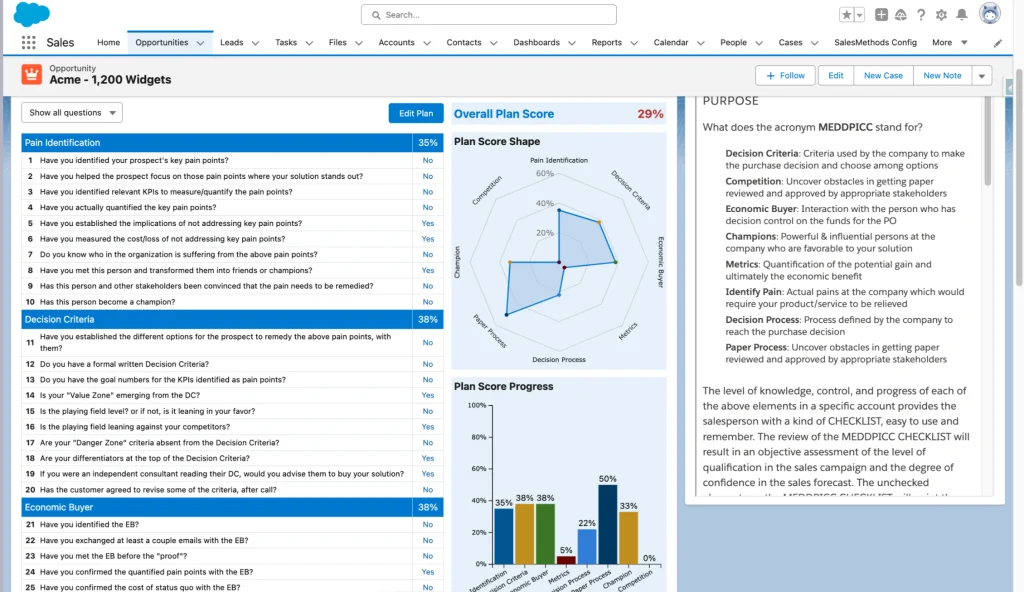
As a result, deals progress through the pipeline without the information needed to properly qualify them. Critical details about the economic buyer, decision criteria, or the customer’s underlying business problem may be discussed in conversations but never captured in Salesforce. When it comes time to review deals or forecast revenue, leaders are often relying purely on individual judgement rather than clear evidence.
This is not about removing the individuality from how your team sells, but some level of consistency is essential. It ensures opportunities are worked in a structured way and, just as importantly, that the right information is captured and visible inside Salesforce.
Embedding your sales methodology directly into Salesforce helps address this gap. Instead of expecting salespeople to remember every qualification step, the methodology becomes part of how deals are worked.
Salesforce native tools like Plan2Close guide sales teams through chosen sales methodologies within Salesforce, prompting the right questions and capturing key information as opportunities progress. Instead of relying on training alone, Plan2Close has live coaching panels, and your methodology simply becomes part of how opportunities are worked.
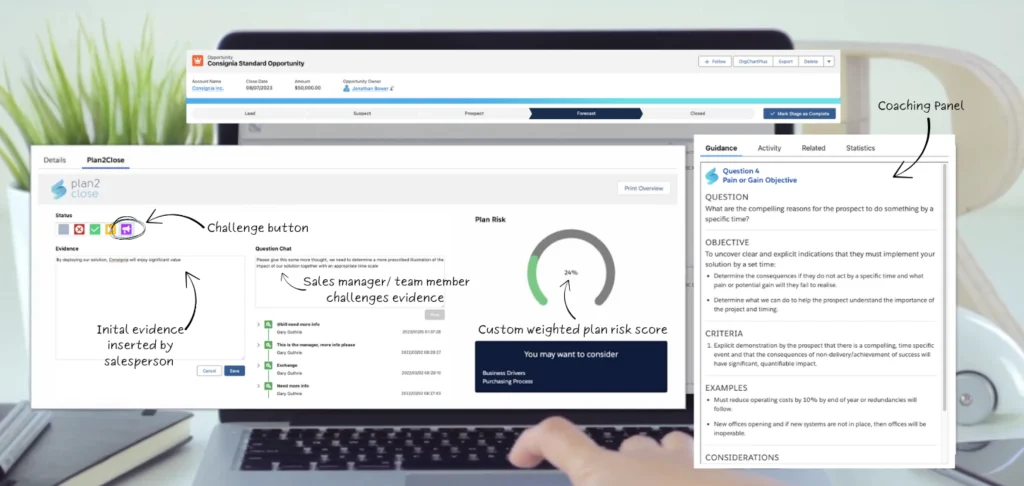
For sales leaders, this provides far greater visibility into the quality of the pipeline. Rather than relying on subjective deal assessments, you can see whether the fundamentals of the deal are actually in place and where risks may exist.
Feel like this is something you and your team might find useful? Use this link to start a free trial and try it in your sandbox!
3. Use Salesforce Reports and Dashboards to Understand Your Pipeline
Salesforce contains a huge amount of sales data, but that data is only useful if leaders can interpret it quickly and confidently. Ultimately, your dashboards should surface the information sales leaders need to understand pipeline health and run accurate forecasts. Well-designed reports and dashboards allow sales leaders to move beyond relying solely on updates during calls or anecdotal feedback on Slack. Instead, they can review key indicators such as pipeline coverage, deal progression, stage duration, and win rates.
These dashboards should focus on answering a few critical questions. Which deals are actually progressing? Where are opportunities stalling? Which deals are most likely to close this quarter?
Of course, dashboards are only as useful as the data behind them. If your Salesforce records contain little more than stage updates and basic notes, even the most sophisticated reports will struggle to provide meaningful insight. Stages are updated, but the details that actually determine whether a deal will close often live in a salesperson’s memory.
Again, Plan2Close helps to address this because, as opportunities progress, key qualification details, stakeholder relationships, and deal risks are captured as the opportunity is worked rather than left undocumented.

Over time, this turns deal knowledge into a company asset instead of something that walks out the door when a salesperson leaves. More importantly for sales leaders, it means reports and dashboards can show not just where deals sit in the pipeline, but how well those deals are actually qualified. It also allows you to coach your team and spot patterns if certain deal types are being qualified too early.
4. Use Salesforce Collaborative Forecasting to Build a Forecast You Can Trust
Forecasting is one of the most scrutinised responsibilities for a sales leader. Hiring plans, marketing investment, and board expectations all depend on the assumption that the revenue forecast is credible.
Yet, confidence in sales forecasts is surprisingly low. We know this from our own conversations with sales leaders, but Gartner research suggests more 50% of sales leaders have low confidence in forecasting accuracy, highlighting how difficult it is for organisations to reliably predict revenue.
Part of the problem is that forecasts frequently drift away from the truth in the underlying pipeline. For example, deals might move stages without any real progress, and confidence levels mean different things to different salespeople. Sales leaders often end up reconstructing the forecast outside the CRM before important forecast calls.
Salesforce Collaborative Forecasting helps bring greater discipline to this process by tying the forecast directly to opportunity data. Each deal is assigned to a forecast category, typically Pipeline, Best Case, Most Likely, Commit, Closed, or Omitted, providing a shared framework for discussing the likelihood of revenue landing within the quarter.
Each salesperson’s forecast contributes to their team’s forecast, which then feeds into the overall company projection. This gives sales leaders a clear view of expected revenue across individual salespeople, teams, and the organisation as a whole, without having to get the data from a spreadsheet.

More importantly, it allows leaders to focus on the deals. A forecast should never be treated as a single figure to defend, but as a collection of opportunities that need to be examined. When reviewing the forecast inside Salesforce, leaders can look directly at the deals carrying the quarter and ask the questions that matter: are the right stakeholders engaged, is the buying process clearly understood, and are there concrete next steps that move the deal toward close? Approaching the forecast this way moves the conversation away from debating the number itself and toward understanding the strength of the pipeline supporting it. Leaders can quickly identify where risk sits in the forecast and where intervention may be needed to move key opportunities forward.
When used properly, collaborative forecasting creates a much clearer connection between pipeline health and the revenue number being committed to the business.
5. Track Sales Activity in Salesforce
One of the most reliable ways to judge whether a deal is progressing is to look at how recently the customer has been engaged. Of course, the engagement quality is important, but opportunities that are genuinely moving forward tend to have a visible rhythm of interaction. Meetings are booked, and follow-ups are agreed. Conversations move from one person in the organisation to another as the deal develops.
When that rhythm disappears, it is usually a warning sign. A deal that still sits in a late stage but shows no recent customer meetings often means the conversation has already stalled. In other cases, the interaction never moves beyond a single contact, which makes the opportunity fragile even if a salesperson feels confident about it.
Sales leaders can use activity data inside Salesforce to spot these situations quickly. If the last meaningful interaction with the customer was several weeks ago, the deal deserves closer scrutiny. If meetings are still happening regularly and new stakeholders are appearing in the conversation, the opportunity is much more likely to be progressing for real.
When emails and meetings are captured automatically in Salesforce, this engagement history becomes easy to review during pipeline discussions. Instead of relying entirely on updates, leaders can look directly at the pattern of interaction and decide whether the opportunity is genuinely advancing or quietly losing momentum.
Capturing activity consistently inside Salesforce makes these patterns much easier to see. Instead of relying solely on stage updates or salesperson commentary, leaders can look at how recently the customer has actually been engaged and decide whether the deal still has momentum.

However, reviewing this manually across every deal is quite the burden. A Salesforce native tool like OrgChartPlus will display the contacts involved in an opportunity as an interactive, visual org chart embedded on the account record, allowing anyone with the right permissions to quickly understand who is involved in the deal and how those relationships connect across the organisation. Each contact card includes a small visual indicator showing how long it has been since someone in your company last engaged with that stakeholder. There are also fully customisable attributes available to show you the exact information you need at a glance. When a key decision-maker has not been spoken to for several weeks, the gap becomes obvious, making it much easier for sales leaders to spot where engagement is fading and intervene before the opportunity begins to drift.
This becomes even more important in enterprise B2B deals, where Gartner research shows that “the typical buying group for a complex B2B solution involves six to ten decision makers.”
Getting More From Salesforce as a Sales Leader
The difference between a Salesforce instance that simply stores information and one that actually helps teams win deals usually comes down to how closely it reflects the way deals are worked.
When the important details of a deal are captured directly in Salesforce like how well the opportunity has actually been qualified, which stakeholders are involved in the buying process, when the team last spoke to them, and what needs to happen next, Salesforce becomes far more useful than a data warehouse.
Pipeline reviews become easier to run because leaders can see what is really happening inside each deal. Forecast conversations shift away from debating the number and toward examining the opportunities that make it up. Instead of spending time chasing updates, sales leaders can focus on helping their teams move the right deals forward.
If you’d like to explore how some of these ideas can be implemented directly inside Salesforce, you can try the tools referenced in this article:
- Plan2Close – start a free trial and see how your sales methodology can be embedded directly into opportunity workflows in Salesforce.
- OrgChartPlus – start a free trial and visualise stakeholder relationships and engagement across the buying group directly on the Salesforce account record.
Both applications are fully native to Salesforce, so you can safely explore them in your sandbox and see how they fit into your existing setup.
If you have any questions, don’t hesitate to get in touch today!
MEDDPICC® is a registered Trademark of Darius Lahoutifard, founder of MEDDIC Academy, where MEDDPICC® courses can be taken.
ABOUT THE AUTHOR