
A Step-by-Step Guide To Improving Deal Qualification Inside Salesforce
- By SalesMethods
- Posted 11/2025
In theory, the process is simple. BDRs “qualify” deals, AEs pick up the baton and close deals while leadership do their best to coach and review the pipeline. If you’ve worked in sales long enough, you know it’s much more complex than that. You could employ the best closer on the planet, but if your feeding them poorly qualified deals, what’s the point?
How many of your “qualified” opportunities are running on gut feelings and optimism?
That’s how you end up with a pipeline that looks full but doesn’t behave like it. Deals sit at late stages with key questions unanswered and AEs spend their first call requalifying what the BDR already “qualified.” Forecast calls stop being productive, as leaders don’t have the information they need to coach effectively.
If you want reliable forecasts, you can’t fix that with more training slides or another spreadsheet template. You need qualification to happen inside Salesforce, in a way that’s structured, visible, and repeatable, without slowing reps down.
In this article, we’ll walk through how Plan2Close can be configured in a way that helps your BDRs qualify while also allowing the data they collect to migrate into a closing plan.
Plan2Close in the Opportunity Record

One of the biggest reasons qualification breaks down is simple: BDRs are qualifying deals everywhere except Salesforce. Notes live in Google Docs, Salesforce fields get skipped, and the actual logic behind a “qualified” deal rarely makes it into the record. A manager sees the stage change, but not the reasoning that justified it, allowing bad assumptions to slip through and pollute your forecast.
Plan2Close removes that gap by living directly inside the opportunity record, the exact place where qualification should happen. BDRs don’t switch tools, open new tabs, or try to force a framework into fields that weren’t designed for it. Everything sits in one workspace, anchored to the deal itself.
When a rep opens Plan2Close, they see a structured qualification model built around the questions your sales leadership cares about most. These are fully customisable to the specifics of your sales motion, whether that’s validating user count, confirming tool ownership, assessing urgency, or anything else that genuinely matters.
The power here is consistency. Every BDR works from the same definition of “qualified,” and every deal is measured against the same criteria. There’s no room for optimism bias or skipping ahead because a conversation “felt good.” For managers, this turns qualification into something visible and inspectable. You’re no longer relying on stage hygiene or rep confidence. You can open an opportunity and see exactly how each question was answered, what evidence supports it, and where the gaps are.
This is the point where your forecast stops leaning on patchy notes and starts using Salesforce data that’s finally reliable enough to make decisions with. Now, we’ll take a look at the process your BDR might follow to qualify with Plan2Close.
The Coaching Panel
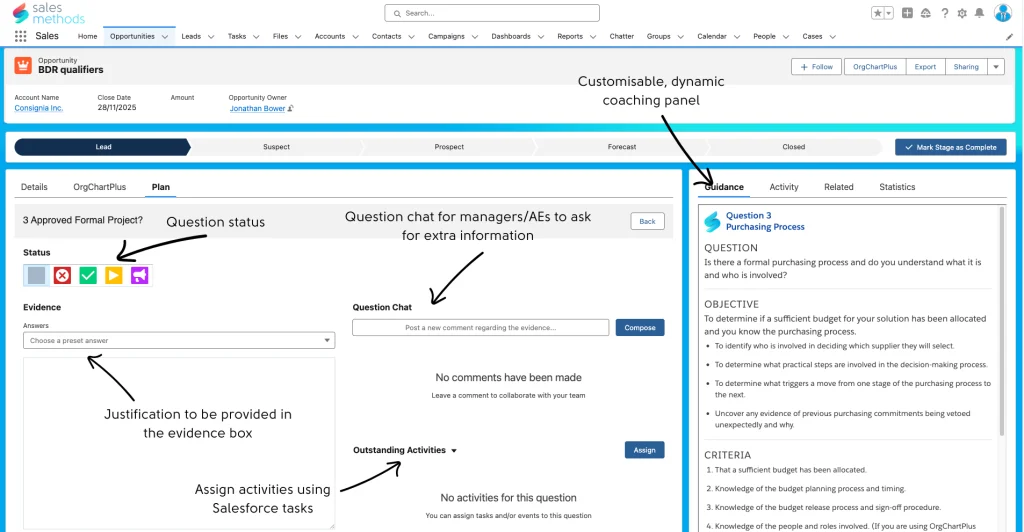
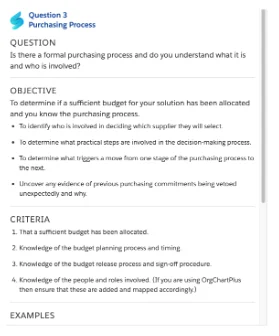
The first step is to click on a question and read the coaching panel. Inside each question, there is a fully customisable panel that changes with each question. Most qualification gaps don’t come from lack of effort. They come from BDRs not knowing what “good” looks like in the moment they need it most, during the call, not in the training session they half-remember from onboarding.
When a rep clicks into a qualification question, they’re not guessing what to look for. They’re met with context written by the people who know the deal cycle best. This could be an AE or sales leader who will eventually inherit the opportunity.
If the question is about the decision process, the panel might spell out what “real authority” sounds like on a call, or highlight the difference between a champion who can influence the deal and someone who simply likes the product. If it’s about timeline, it might include examples of the phrases customers use when urgency is genuine versus when it’s aspirational.
The point isn’t to spoon-feed scripts, but to shape the rep’s thinking while they’re qualifying, so they collect the kind of information that actually helps move a deal forward later. This eliminates one of the most expensive patterns in a sales organisation: BDRs doing their best with incomplete mental models, only for AEs to spend the first half of the handover call re-running discovery because they don’t have the details, or what has been collected is useless.
With the coaching panel, guidance lives inside the workflow, not in a forgotten training deck. New hires ramp faster and experienced reps pick up nuance they would’ve missed. Leaders can inject best practice directly into the moments that define whether a deal is strong or shaky.
Capturing Evidence
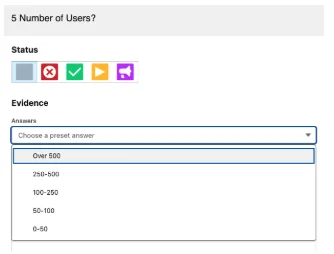
Each question has dedicated space for evidence. After or during a call, this is where the BDR records the important information they learned and any details that support their answer. Preset answer options help standardise responses for reporting. For example, you could have a dropdown with “Budget approved,” “Budget not discussed,” “Formal project confirmed”. But the evidence field lets them go further, to add context about why that’s the case, what the customer said, or what still needs verification.
Instead of storing discovery notes in random places or a field that no one reads, the reasoning behind every qualification call now lives in Salesforce, accessible by everyone with the necessary permissions. Managers don’t need to hunt through notes or recordings. They can open the opportunity and see exactly what was discovered, in the salesperson’s own words. Also, using the coaching panel, your BDR can see what good evidence looks like in real time, and model their response on that.
Setting Question Status
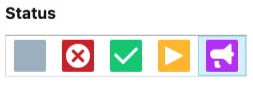
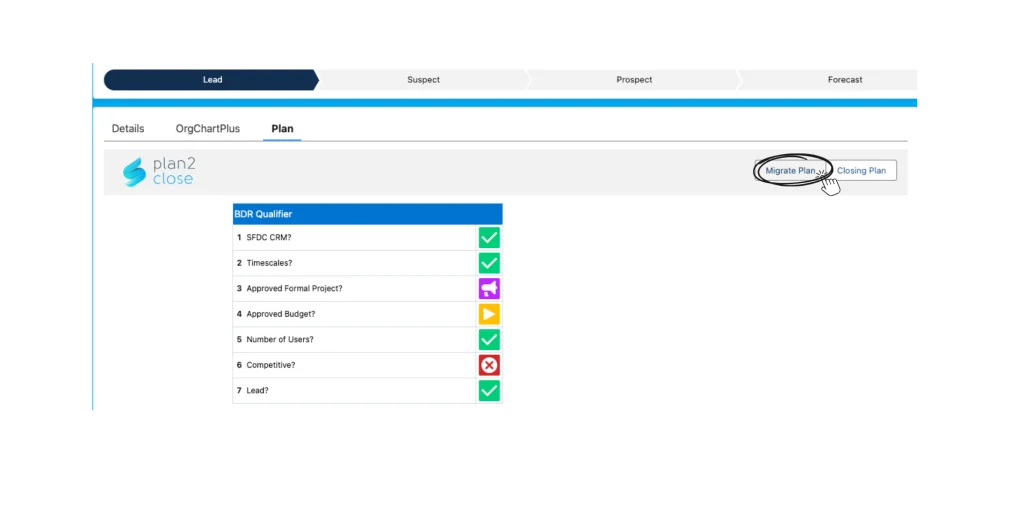
Each question has a simple traffic-light status. Red means the requirement can’t be satisfied. Amber means it’s still being worked on, green means confirmed, while purple flags it for manager review.
The BDR would then select a status for each question based on the information they’ve gathered. They can’t skip or leave it blank. That small design choice eliminates the grey area where deals get pushed forward without real evidence.
For a sales leader, this matters because it converts the word “qualified” from opinion to data. When you review the pipeline, you can instantly see which parts of qualification are weak, where assumptions have been made, or where coaching is needed.
Now, you stop hearing “I think this deal is solid.” You start seeing proof, question by question. The qualification framework becomes measurable instead of anecdotal.
Collaboration Through Question Chat
Each question has its own chat thread. If a manager wants clarification, say, how the BDR verified the number of users then they can ask directly within that question. AEs can also add comments if they need more information before the deal is handed over.
All communication stays attached to the record, not spread across Slack or email. Anyone reviewing the deal later can see the entire conversation that led to each answer. Coaching becomes part of the workflow, not an interruption. Handovers stop being one-way. The AE inherits a deal they’ve already been involved in, reducing context loss.

Assigning Outstanding Activities
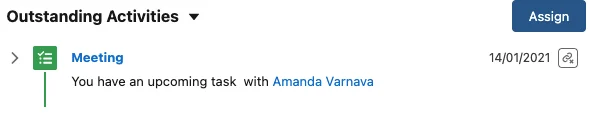
If a question isn’t fully resolved, for example, budget is “in progress” but needs confirmation, the BDR can create an activity directly from that question. It might be a task to confirm pricing authority or schedule a follow-up call. Your BDR can create this task and assign it within the opportunity record. That activity stays connected to the qualification process. When it’s complete, the question can be marked green.
There’s no gap between identifying a qualification risk and taking action to close it. Tasks stay visible and accountable inside the same record. Managers don’t need to chase updates; they can see progress in real time.
Migrating the Plan
Once all questions are complete, the BDR migrates the plan. One action transfers everything: question statuses, evidence, comments, activities into the AE’s closing plan. The AE doesn’t have to rebuild anything. They can open the plan and immediately see what’s been discovered, what’s confirmed, and what still needs attention.
The handover becomes a continuation, not a reset. Deals stop losing momentum between qualification and pursuit. AEs begin with full context and can focus on advancing the opportunity, not requalifying it.

What Does This Mean for Leadership?
For sales leaders, Plan2Close creates visibility into how qualification is happening, not just whether it’s done. You can see which questions typically block progress, which BDRs qualify more effectively, and where additional coaching is needed.
Pipeline reviews stop revolving around opinions or assumptions. Every deal can be inspected at a granular level. You can see what evidence supports it, what’s missing, and who validated it.
Qualification becomes a repeatable process that scales. Managers gain a real picture of pipeline health while salespeople get clarity on what “good” looks like. And leadership can finally trust that what’s marked as qualified actually meets the bar they set.
How To Get Started
Teams usually realise the impact of Plan2Close the moment they run their first pipeline review with it. The conversation changes. Instead of asking, “How confident are you in this deal?” you’re asking, “Show me the evidence.” That one shift removes hours of back-and-forth and replaces it with clarity you can actually forecast against.
If qualification is where deals get messy, inconsistent, or overly optimistic, this is the cleanest way to fix it, inside the CRM your team already uses.
Ready to See It in Your Pipeline?
Using this link, you can try Plan2Close inside your Salesforce org for 30 days and see how your pipeline behaves when qualification is based on evidence, not optimism.
If you’d like a walkthrough tailored to your sales process or want to understand how other teams standardise their qualification using Plan2Close reach out to our team here.
ABOUT THE AUTHOR