How to Use MEDDIC and MEDDPICC® in Salesforce: Build vs. Buy
- By SalesMethods
- Posted 03/2026
- Blogs
Understanding MEDDPICC® isn’t the struggle sales teams face; after training, they will usually have a good grasp on how to apply the methodology to their deals. The measure of whether your investment in training pays off comes down to three main things: consistent adoption among salespeople, measurable improvements in close rates, and data capture that actually influences decisions.
The truth is, implementing MEDDPICC® in Salesforce can be as straightforward as adding custom fields so that the framework is visible across every opportunity. The isssue we see is that visibility alone doesn’t compel salespeople to qualify deals rigorously, and it does nothing to ensure the data being captured is actually used in a meaningful way.
Instead of just thinking, “how can I get MEDDIC into Salesforce?” and looking for the simplest option, we urge you to consider what’s actually best for you: building it yourself or buying a purpose-built solution.
In this article, we’ll walk you through both approaches. First, how to implement MEDDIC or MEDDPICC® yourself. Then, we’ll look at a Salesforce-native app that embeds the methodology directly onto opportunity records. We’ll cover the pros and cons of each so you can make the right call for your team.

What It Means to Implement MEDDIC or MEDDPICC® in Salesforce
MEDDPICC® gives sales teams a shared way to qualify and work complex deals. Bringing the methodology inside Salesforce should mean more than just giving your team a set of fields to fill in; we believe a MEDDPICC implementation means
MEDDIC or MEDDPICC should begin to shape how opportunities are worked, how stages are progressed, and how managers review pipeline. If you want to understand why MEDDPICC® belongs inside Salesforce, the logic is straightforward. The harder question is what “inside Salesforce” actually needs to look like.
Lots of sales leaders we speak to initially see it as a data capture problem. Add a way for the sales team to input data, and the methodology is technically in Salesforce. Good enough, right? We don’t think so! That is the first layer, and of course, it’s important. Your team does need somewhere to record who the economic buyer is, what the decision criteria look like, and where the identified pain sits. But if implementation stops there, what you have really built is a storage system, instead of a qualification framework.
The second layer is enforcement, and this is where we’ve seen most custom setups fall short. Enforcement means MEDDPICC® data has to be captured at the right time (before a deal moves to the next stage, not retrospectively). From our conversations, custom builds usually end up with sales teams backfilling data just to keep the boss happy – a waste of time for everyone!
The third layer is behavioural. This is about how the data gets used, it should be read, questioned, and acted on. It means managers reviewing MEDDPICC® fields during deal inspections, not as a compliance check, but as the basis for coaching. It means forecast calls that reference identified pain and decision process rather than anecdotal confidence. It means the qualification data influences pipeline decisions.
If all three layers are not present, MEDDPICC® is not implemented inside Salesforce in any meaningful sense.
Building MEDDPICC® in Salesforce Yourself
If you want MEDDPICC® inside Salesforce without installing anything, you can build it. The setup is not especially complex, but it has more moving parts than most teams expect going in.
Let’s take a look at what the build actually involves.
Create The MEDDPICC® Fields
Start on the Opportunity object. You need one picklist field for each MEDDPICC® element – Metrics, Economic Buyer, Decision Criteria, Decision Process, Identified Pain, Champion, Paper Process, and Competition. That’s eight fields if you’re running the full framework, six if you’re using the original MEDDIC.
Rather than creating eight separate picklists with eight separate value lists, create a single Global Value Set with your status options (typically Red, Yellow, Green) and apply it across every field. This keeps your values consistent and means you only need to update one place if you ever change the scale.
At this point, MEDDPICC® technically exists in Salesforce. But a row of eight picklists on an Opportunity layout doesn’t help much during a deal review, which is why most teams add a visual layer.
Add Traffic Light Visuals
Instead of displaying “Red” and “Green” as text, you can show colour-coded icons that a manager can read at a glance. The approach uses three pieces of Salesforce functionality together.
First, upload a set of traffic light images as a Static Resource, typically a zip file containing a red, yellow, and green icon for each MEDDPICC® element. Then create a formula field for each element that uses Salesforce’s IMAGE function to display the correct icon based on the picklist value. Salesforce has a help article that walks through this exact pattern, showing a specific image depending on the value of another field.
You’ll end up with eight formula fields (one per element) that each display a small coloured icon. These sit behind the scenes (they don’t go on the layout directly).
Build a MEDDPICC® Summary Field
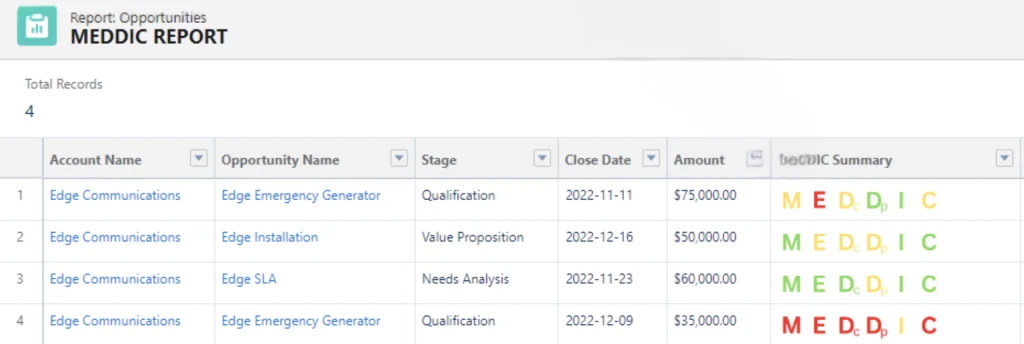
Create one more formula field (call it something like “MEDDPICC Summary”) that brings together all eight image fields into a single visual strip. One field, eight icons.
That summary field can go on the Opportunity layout and, more importantly, into reports. In theory, you’ll be able to scan a pipeline report and see the qualification shape of deals without opening a single record. Weak areas show up as red dots in a line of green. It’s simple, but for pipeline reviews it will help.
Most teams also add long-text “notes” fields alongside each picklist (Metrics Notes, Economic Buyer Notes, etc.) so salespeople have somewhere to capture the reasoning behind each colour. A traffic light tells you the status. The notes field tells you why and that’s the part managers actually need during coaching.
Daniel Marcus’ guide to configuring a MEDDIC summary in Salesforce walks through this entire build step by step, including the formula syntax and image setup. It’s a solid reference if you want to follow the exact configuration.
Gate Your Stages
Fields and traffic lights will give you the visibility we mentioned earlier, but they don’t give you enforcement. If a rep can progress a deal from Qualification to Proposal without completing a single MEDDPICC® field, then the methodology is optional, and the reality is, optional methodologies don’t get followed.
This is where validation rules come in. You can create rules that block a stage change unless specific MEDDPICC® fields have been completed. For example, you might require Economic Buyer and Identified Pain before a deal can enter Proposal stage, and require Decision Process and Champion before it can move to Negotiation.
How aggressively you gate depends on your team. Some organisations require every field at every stage. Others take a lighter approach, requiring a few critical fields early and adding more as the deal progresses. There’s no single right answer, but the principle holds: if MEDDPICC® completion isn’t tied to deal progression, it will be treated as admin, not qualification.

The Limitations of a MEDDPICC® Build in Salesforce
You can get a long way with this setup, but three things tend to surface as the team grows or the methodology matures.
The first is maintenance. Every change, a new question, a modified scoring approach or a different stage gate requires admin work. The MEDDPICC® configuration isn’t a product someone owns; it’s a collection of fields, formulas, and rules spread across Salesforce setup. Over time, especially if the original admin leaves, the logic gets harder to follow and easier to break.
The second is data quality. A traffic light field captures a judgement, not evidence. “Champion: Green” could mean the rep has a committed internal advocate who is actively selling on their behalf. It could also mean the rep had a friendly conversation with someone senior-ish. There is no mechanism in a picklist to distinguish between the two. Notes fields help, but they’re optional, unstructured, and rarely reviewed consistently.
The third is coaching. The build gives managers a visual summary of where deals stand, which is useful for spotting gaps. But it doesn’t help them inspect the substance behind those gaps. A manager can see that Decision Process is red, they can’t see what the rep has actually tried, what evidence exists, or what the next step should be. That conversation still happens manually, outside the system, and it scales poorly.
None of this means the DIY approach is wrong. But it’s worth understanding where the ceiling is before you hit it.
Using a Native MEDDPICC® Tool in Salesforce
The alternative to building it yourself is installing a tool where the methodology is already structured. Plan2Close MEDDPICC®, which we built in partnership with MEDDIC Academy, is designed to do exactly this – embed MEDDPICC® directly on the Opportunity record so qualification happens where your team already works.
But what does that actually look like day to day?
For the salesperson using MEDDPICC
Instead of filling in a traffic light picklist and hoping it’s enough, a salesperson opens Plan2Close on their Opportunity and sees the methodology broken down into specific questions, grouped by element. Pain Identification, for example, has ten questions.
The answers can be configured as yes or no, or you can assign a customised status. This removes the ambiguity of choosing between Red, Yellow, and Green. Each question has a coaching panel that can be customised to show what a good answer looks like, or prompting questions the rep can use in actual conversations with the prospect (or both). If a salesperson is about to jump on a call and needs to dig deeper into Decision Process, they don’t need to remember training notes. The guidance is right there, in context, at the moment they need it.
When they answer a question, they back it up with evidence. This can be written notes, file attachments, whatever supports the answer. They can also create follow-up tasks or meetings tied directly to that question, and collaborate with their manager through a built-in chat. So if a salesperson can’t confidently confirm who the Economic Buyer is, that gap doesn’t just sit as a “No.” or red traffic light, it becomes a task, a next step, a conversation.

The unanswered questions effectively become a working deal plan. They point the salesperson toward the right actions in the account, the conversations they still need to have, the information they still need to uncover. As they progress, two score charts update in real time. One is a a radar chart showing the balance of qualification across all eight elements, and a bar chart breaking down progress per element. The salesperson can see exactly where they need to focus, and how close the deal is to being genuinely qualified.

For the sales leader
Every deal in the pipeline gets a calculated MEDDPICC® score, a percentage built from confirmed, evidence-backed answers across all eight elements. That score is available on the Opportunity, in reports, and in dashboards. It’s not a subjective traffic light, but a number tied to actual qualification progress.
A manager can open any deal and immediately see whether it’s been qualified to the stage it’s sitting at or whether it got there on momentum and optimism.
That changes pipeline reviews. Instead of asking “talk me through this deal,” a manager can say “I can see Decision Process is at 22% and you’ve got no Competition coverage — what’s the plan?” The conversation starts from evidence, not anecdote. Coaching becomes specific. Forecasting becomes something you can defend, because the scores across your pipeline are built on data your team has actually worked to confirm.
Over time, patterns emerge. Are deals consistently weak on Paper Process? Is there a stage where Champion scores drop off? Is one team qualifying more rigorously than another? The data starts telling you where to focus across the whole organisation.
What about support and onboarding?
One concern teams have when adopting any new tool is whether the vendor will actually be there when they need help. We understand that — you’re asking your team to change how they work, and that transition needs to be supported properly.
Rather than make promises, here’s what our AppExchange customers say:
“The support is speedy, and SalesMethods is open to having users contact them rather than having the admin in the middle. Really appreciate the product and the service!”
“Throughout our implementation, SalesMethods has provided exceptional support and responsiveness. Their thorough and flexible training sessions and customer service have been efficient and helpful.”
“SalesMethods customer support is second to none.”
MEDDPICC Build vs Buy: How to Choose
So, now you understand both approaches, the question is which one fits your team.
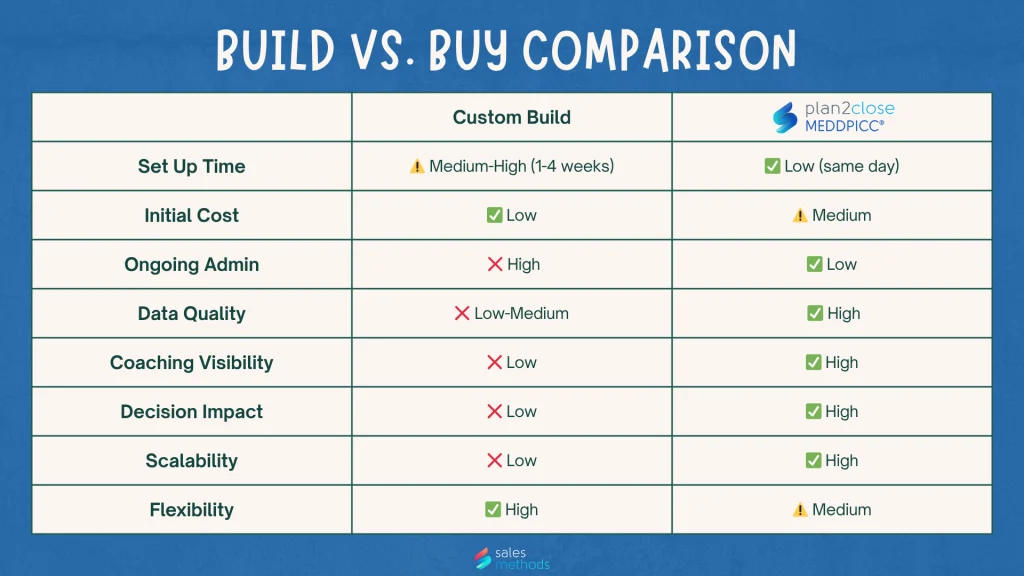
The table makes the pattern clear. A custom build wins on initial cost and flexibility because you’re not paying a subscription, and you can configure Salesforce freely. However, it loses on almost everything that determines whether MEDDPICC® actually works over time: data quality, coaching visibility, decision impact, and scalability. Those are the criteria that separate “MEDDPICC® exists in Salesforce” from “MEDDPICC® is changing how we sell.”
If your team is small, your admin is strong, and you simply need a structured view of qualification status, build it. If you need MEDDPICC® to produce data that managers can inspect, coach from, and trust in a forecast, then the tool-based approach gets you there faster and holds up better as you grow.
The honest question to ask yourself: when a manager opens a deal in your pipeline today, can they tell whether it’s been genuinely qualified? Or are they relying on the salespersons word?
Your answer tells you which path you need.
Where to Start
If you want to see what the tool-based approach looks like inside your own Salesforce org, try Plan2Close MEDDPICC® free for 14 days. If you’d rather talk through your requirements first, get in touch with our team.

MEDDPICC® is a registered Trademark of Darius Lahoutifard, founder of MEDDIC Academy, where MEDDPICC® courses can be taken.
ABOUT THE AUTHOR