
Turn LinkedIn Data Into Org Charts Without Leaving Salesforce
- Posted 07/2025
- Blogs
Everyone knows the rhythm: open LinkedIn, copy a name or job title, flip to Salesforce, paste, rinse, repeat. Only 35.2% of a salesperson’s time is spent actively selling, with the remaining 64.8% eaten up by admin work like data entry, reporting and prospect research. Then comes the clean-up: duplicates, missing titles, bad emails. 32% of salespeople spend an hour or more every day on CRM data entry, adding up to over 5 hours a week before they even pick up the phone.
After you’ve spent all that time doing the ‘admin’ part of the job, is the data really that useful? You’ve got a couple names and roles. Does a job title tell you real influence? Does it show you who’s really going to have the final say on your deal? The person you think is in charge could have little to no power.
In this article, we’ll take a look at how you can win that time back and make the data genuinely useful.
Salespeople Need More Than Just LinkedIn
LinkedIn is indispensable. Top sellers spend an average of 7 hours per week using LinkedIn for research, networking, and content creation. Yet the magic fizzles fast when your data’s disconnected and away from your CRM, your company’s supposed “single source of truth.”
Think about it: LinkedIn is packed with data you’d pay gold for (job moves, insight into personality, new hires) so why does it revolve around such an inefficient process? Your team could instantly access live data without ever leaving Salesforce. Your CRM should be a living system, but manual entry turns it into a spreadsheet museum.
Your team aren’t admins, and every wasted minute steals time from doing what they’re great at: building relationships, and closing deals. They deserve better than endless tab-hopping. Their life shouldn’t be copying and pasting, it should be confidently mapping the people who can actually help them close a deal.
For your CRM to really make a difference to your team, it should reveal exactly who’s influential, who makes decisions, and who can move your deal forward. If your most valuable intelligence is relying on a copy/paste process, or you’re not even storing the data, then your Salesforce org can’t become the dynamic resource you need.
That’s why the problem isn’t LinkedIn, it’s LinkedIn disconnected from everything else.
Let’s take a look at how you can start turning LinkedIn data into org charts without leaving Salesforce.
LinkedIn and Salesforce Integration
Start by searching LinkedIn for an account while in Salesforce. PipeLaunch automatically searches LinkedIn and presents the best match to your Salesforce account record. To connect, all you have to do is click “Match LinkedIn Profile”.
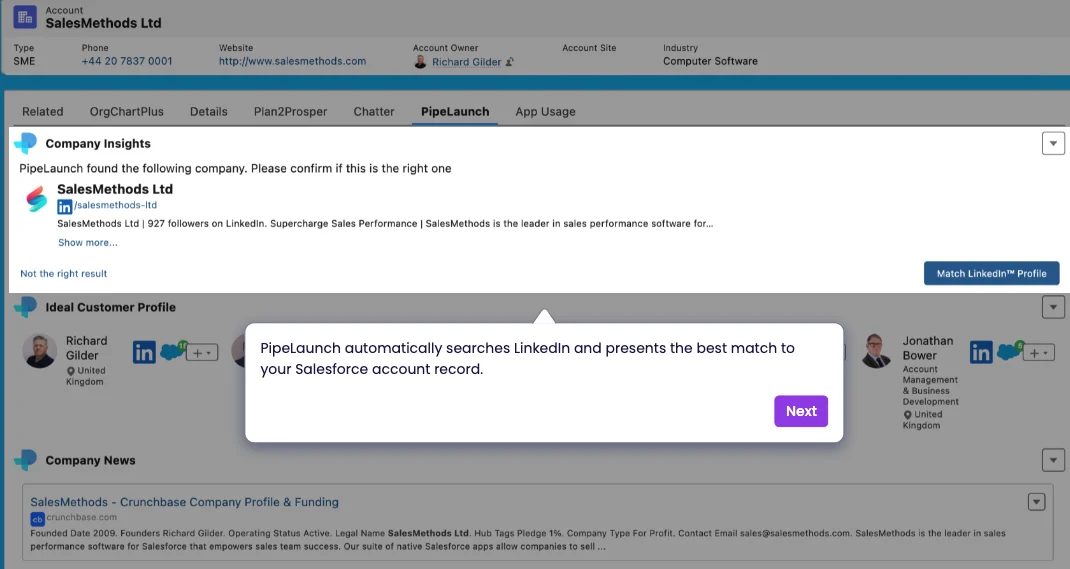
If you’re selling across key accounts, context is so important, and PipeLaunch gives it to you instantly. It connects Salesforce records to live LinkedIn profiles, so you can spot who’s who without switching tabs or second-guessing job titles. Forget outdated contacts or chasing ghosts. Just a clear, verified view of your prospect, their team, and the broader org all surfaced automatically, right where you’re already working. That means faster outreach, sharper targeting, and less time hunting for the right person to speak to.
What Data Do I Get From PipeLaunch?
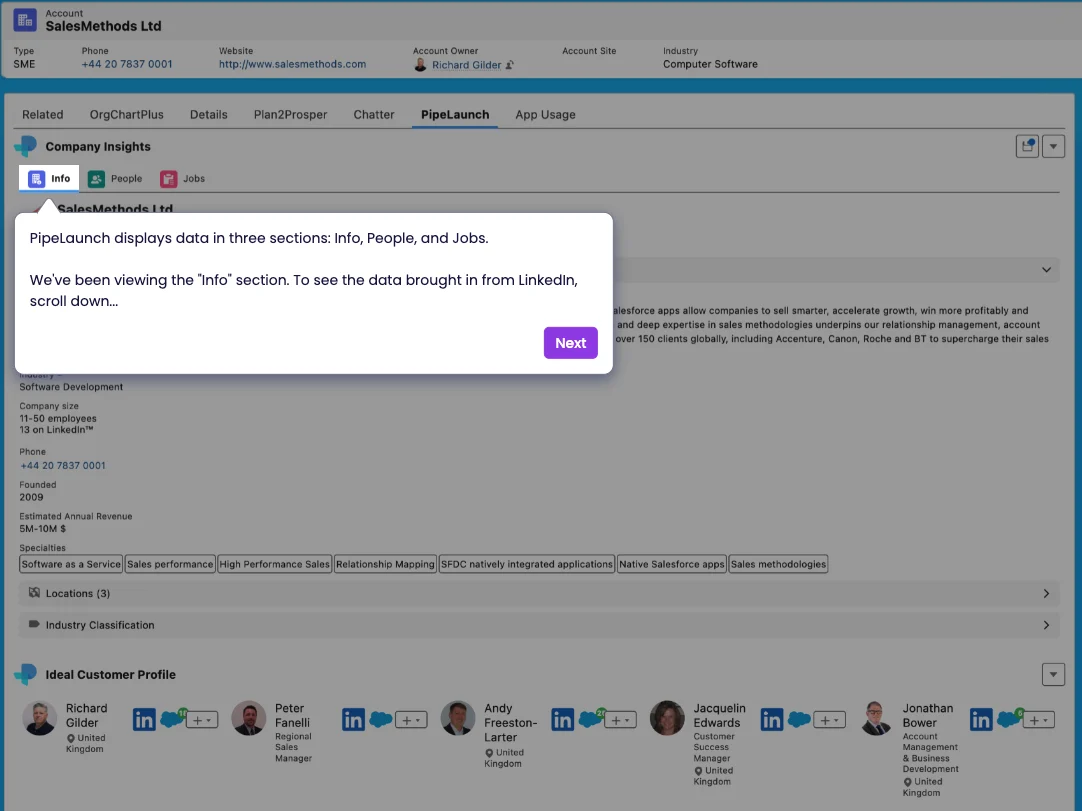
PipeLaunch gives you live, actionable company intelligence pulled directly from LinkedIn and surfaced natively inside Salesforce.
The Info tab gives you the big picture without having to Google around. You’ll see the company’s LinkedIn description, industry tags, size, revenue range, employee count, how many are active on LinkedIn, plus a real-time feed of company news like Crunchbase funding data. This allows you to show up like you’ve done your homework before you’ve even picked up the phone, without spending hours searching.
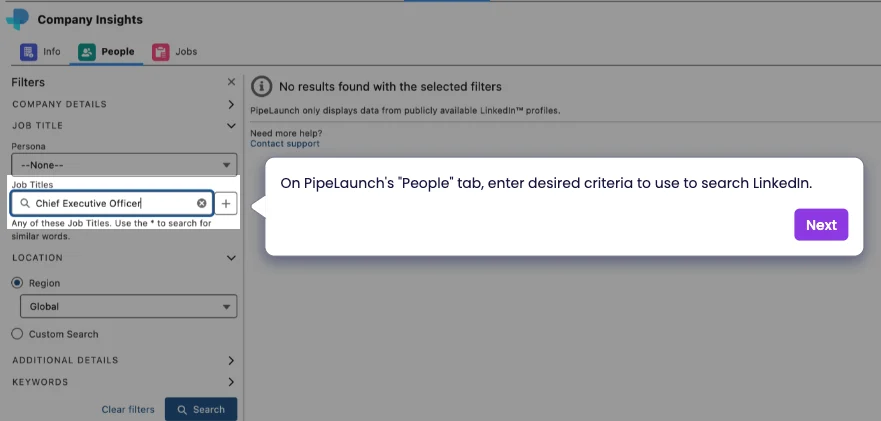
The People tab is where the real power lives. Instantly see who works there, filter by title or location, and identify not just the hiring manager but the team they manage. Instead of jumping between tools or InMailing blindly, you’re narrowing your focus to the exact person most likely to engage.
The Jobs tab brings in open roles the company is hiring for right now, straight from LinkedIn. That means you’re tracking real movement. If they’re hiring a VP of Engineering in London, you now know two things: there’s a leadership gap, and they could be open to new vendors.
Individual Contacts
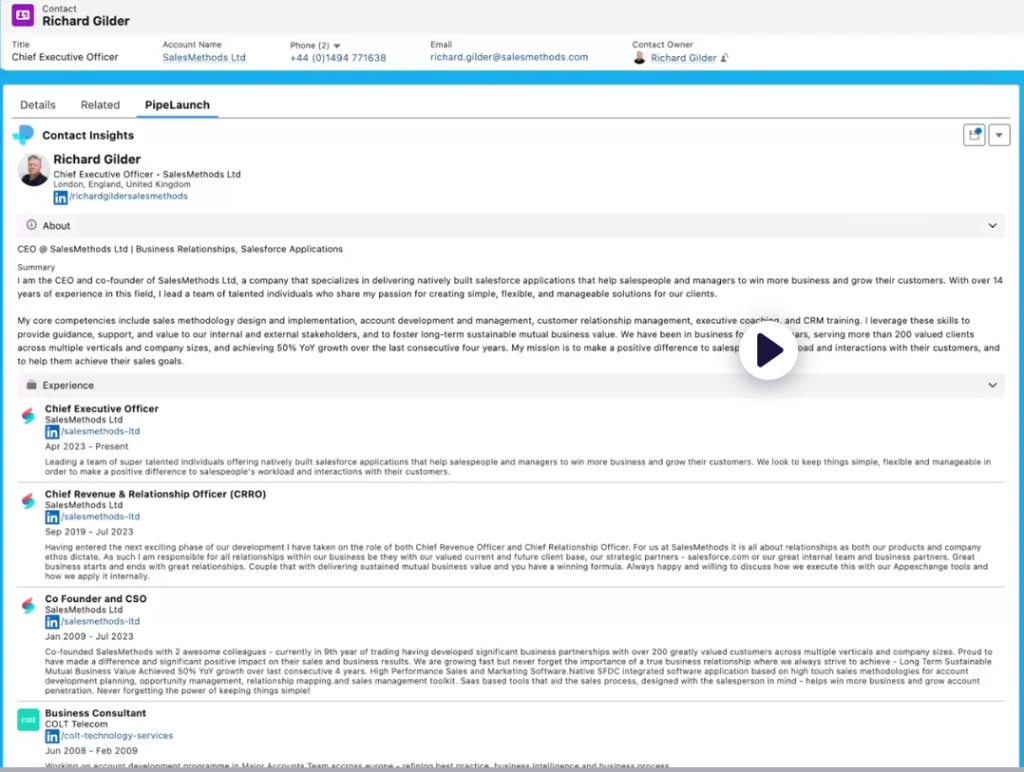
You can also search LinkedIn for a contact and connect your Salesforce record following the same process as with the account. Every one of us has hit the same wall: you find the account, Salesforce gives you a name, maybe a job title, and nothing else. No idea if they’re still there or any other data. So you jump to LinkedIn, open their website and cross-reference titles and try to learn a bit about them. Now you’ve got to hope it’s the right person, and waste time on what could’ve been instantly accessible.
PipeLaunch cuts that out. You search directly inside Salesforce, confirm identity with live LinkedIn data, and see a full work history and bio in one place. Now you know who to approach, and whether they’re worth your time.
Build The OrgChart Before You Reach Out
Most salespeople start with a job title and work backwards. OrgChartPlus flips that on it’s head. Start with the structure and then layer in the people.
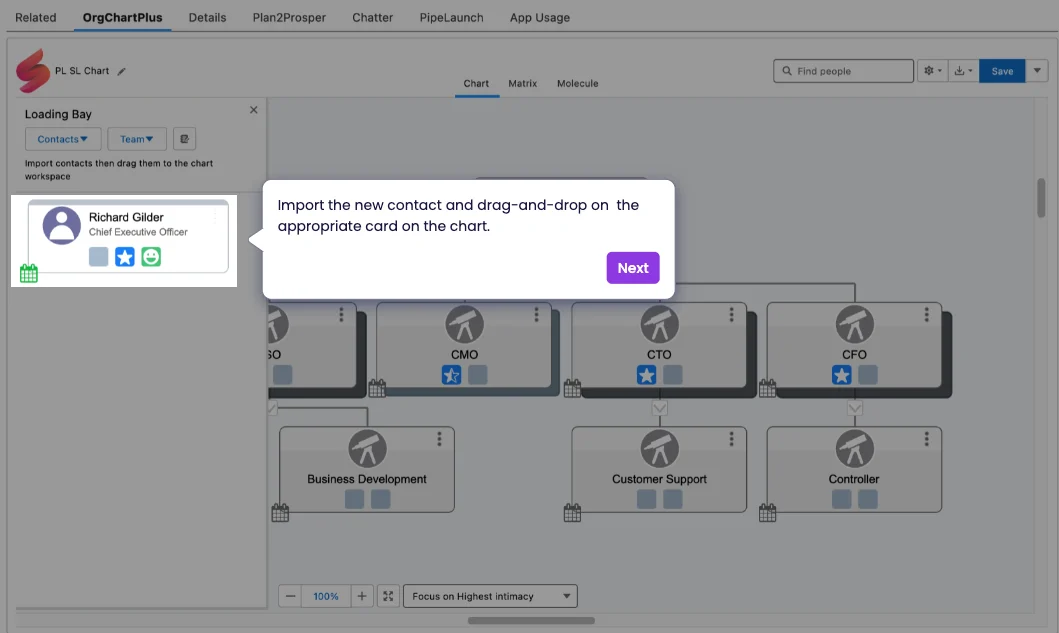
Use a template to map the roles you care about: who does this person report to, who do they influence, who might block the deal? Then use LinkedIn to find the names and drop them into the chart.
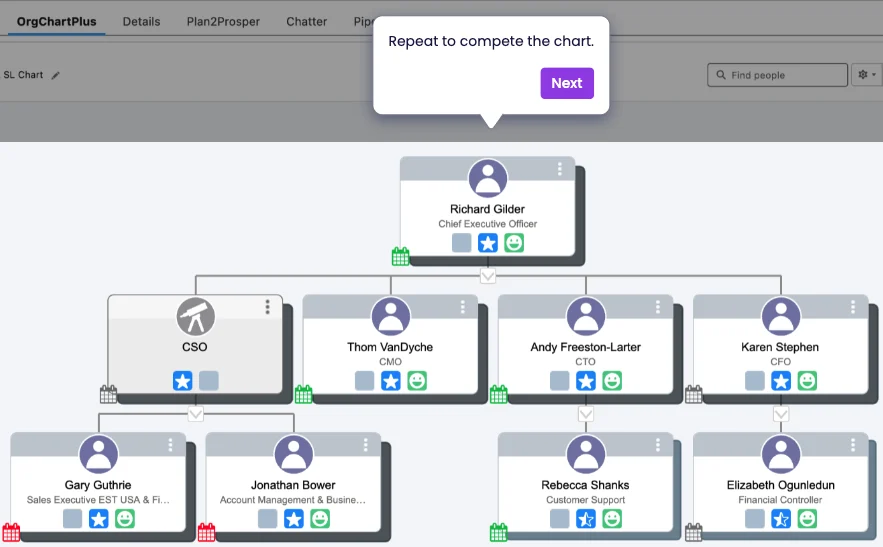
Now instead of guessing who’s involved, you’ve got the whole decision circle in one view – champion, influencer, budget holder, and gatekeeper. You know who to message first and you know who to cc.
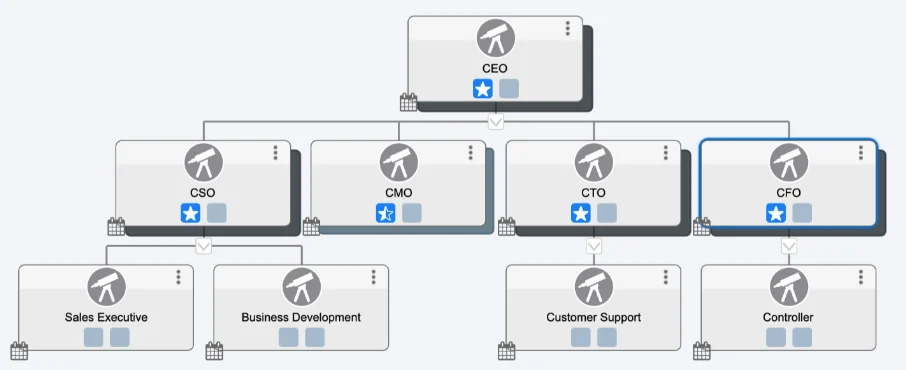
The slideshow below will show you how you can populate the template using PipeLaunch inside Salesforce.



Now You’ve Got Your OrgChart, What Else Can You Do?
If you work in enterprise accounts, you already know the job isn’t just “find the right person.” It’s figuring out who gets to decide who the right person is and how to influence that process without wasting weeks in email limbo.
That’s what OrgChartPlus gives you. A working map of power, politics, and persuasion inside your target accounts. At a basic level, you can drop in contacts from LinkedIn and build your own org chart in minutes. But what happens next is where the real value lies.
You don’t just draw lines. You tag influence and sentiment. You capture who loves you, who’s blocking you, who’s sitting on the fence. You add nuance like whether Bryony Allen, the CEO, controls the budget, prefers to be contacted directly, and hates long emails. You leave a note so your colleagues know it too.

You document conflict like how Georgie Bray and Ben Jones don’t get along, so aligning them on pitch is a political liability, not an asset. You show who really has a say on the deal closing, and who just signs the paperwork.
Better yet, all of these attributes are fully customisable, so if you want something tagged about every single person in the org, this is how.
Most sales teams still operate in the dark on this, assuming buying decisions follow formal hierarchies. They don’t. Anyone who’s been ghosted after four great calls knows that.
OrgChartPlus lets you capture the real map: the influence paths, the blockers and the momentum. And you keep that intelligence inside Salesforce, where it actually gets used. Not in someone’s notebook or a spreadsheet that your manager forces you to update.
Track your relationship depth. Not just “do we know them” but how well. Are they a target? A contact? A champion? Because when your point of contact gets promoted or poached, that distinction will matter.
This is the difference between reactive and strategic selling. The difference between being another vendor, and being the person who really understands how the business works.
Summary
You don’t need more tools. You need fewer tabs, cleaner data, and a faster path to the right person. PipeLaunch and OrgChartPlus strip out the admin overhead and give you what you actually need: live LinkedIn data inside Salesforce, and the power to map influence and politics, to get your deals more resilient, and closed faster.
You get real context on who matters, how they’re connected, and whether they’ll pick up your call. You move faster, waste less time, and close smarter. And if you bundle both tools, you get all of it for less.